The app
A lesson the child can follow
Piano Together is built for a grown-up and a child on the same iPhone or iPad. The child practices. The grown-up keeps profiles and the subscription behind a check.
During a lesson
Show, then your turn
The grown-up plays the lit keys first. The child answers with the same lights. The lesson says which hand to use.
A named retry
A different note does not end the lesson. The app names the note to try, and asks for that key once more, slowly.
Numbered hands
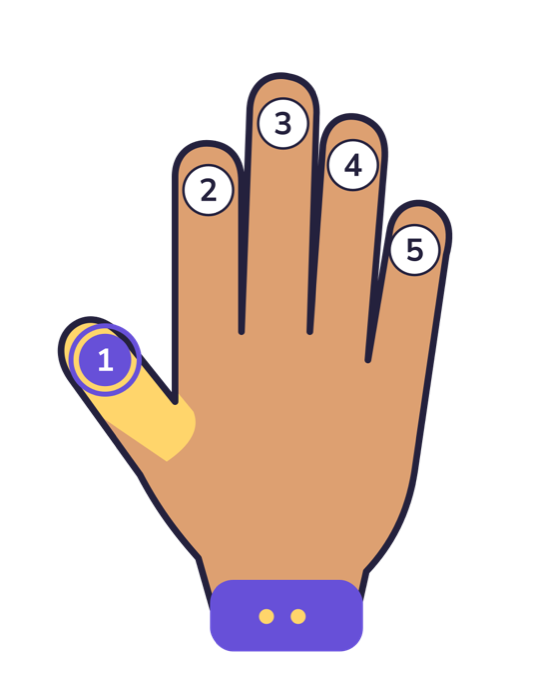
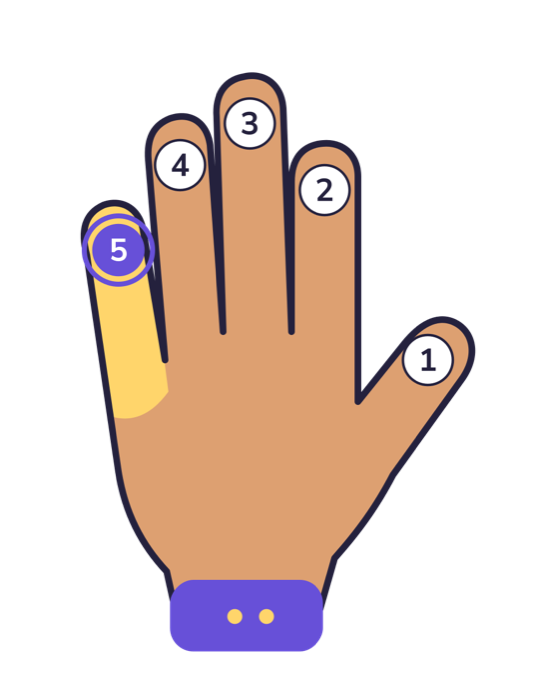
A hand picture highlights the finger for the current note. The same numbers are used on the left and right hand.
A staff when it helps
The Early presentation uses lights and larger keys, without a staff. Growing and Independent add the staff.
Age chooses the starting presentation
A grown-up can change it later.
- Ages 4–5, Early. Larger keys. Coaching starts open. No staff.
- Ages 6–8, Growing. Staff notation and written steps.
- Ages 9–10, Independent. The same reading tools, with a slightly smaller keyboard.
Lesson wording follows age too. Ages 4–6 hear play-based language. Ages 7–10 hear reading language. Saying note names is optional.
Around the lessons
Songs
Thirty tunes, from first patterns on C to short classical excerpts. Songs show a staff and falling notes at a slow practice tempo.
Progress
Completed lessons, songs, stickers, badges, and practice sessions stay with that child’s profile.
Two languages
The interface is in English and Spanish, including lesson titles, finger names, and the parent area.
On this device
Profiles and practice are stored on the device. The app does not ask for an account with Northeastern Software.
For the grown-up
The parent area asks a math question before it opens. Inside, a grown-up can switch children, edit a nickname, age, picture, presentation, and an optional 5- or 10-minute practice goal, and can delete a profile. Deleting a profile removes that child’s practice from the device.
One subscription covers every child on the device, up to five profiles. The second child and the lessons after the free set need Piano Together Pro.